 LinkedIn
 Facebook
 X.com
X.com
 WeChat
 Email
Email
To provide a faster and more seamless documentation experience, Maersk now enables customers to submit and manage Switch Bill of Lading (Switch B/L) requests directly through the Maersk.com website.
By using the online solution, customers can raise requests anytime, track progress 24/7 in real time, and reduce manual email exchanges, resulting in a more efficient and transparent process.
How to Submit a Switch B/L Request
- Customers surrender the full set of the 1st Original Bill of Lading (OBL) at Maersk’s counter desk, clearly indicate "Switch B/L" as the reason for OBL surrender, and provide the new Transport Document Receiver for the 2nd OBL.
- Customers log in to Maersk.com and select the relevant Bill of Lading.
- Choose “Switch Bill of Lading”.
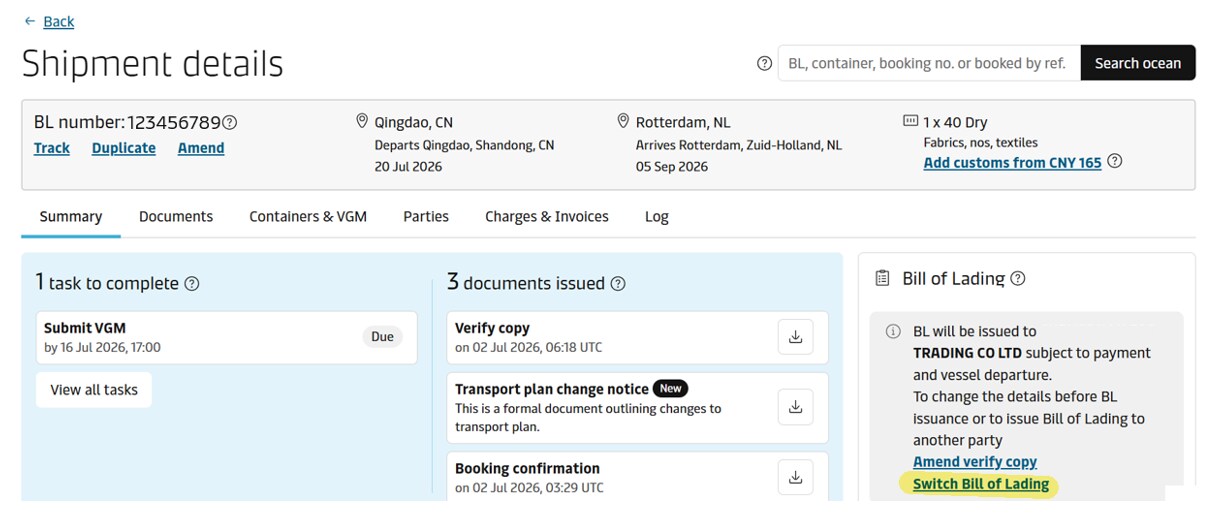
- Update the required information and submit the switch bill request.
- The Switch B/L fee will be applied and invoiced within 24-48 hours.
- Submit the switch request and monitor its progress online. Customers who have signed the Web Agreement can download the originals from the shipment details page on Maersk.com. The remaining customers may approach the counter to collect the final Bill of Lading.
We encourage all customers to utilize the digital Switch B/L online service on Maersk.com and benefit from a faster, more transparent, and user-friendly process that saves time and provides greater control over your shipments.
Should you have any questions or require assistance, please contact your local Maersk representative or visit Maersk.com.